Cull a wildlife shoot
in minutes, not evenings.

WildCull measures every frame and marks the ones that are measurably bad — soft, shaken, blown out — so you only spend your eyes on what’s worth it. And it shows its working for every verdict.

Windows · Fully unlocked trial · No card needed to try

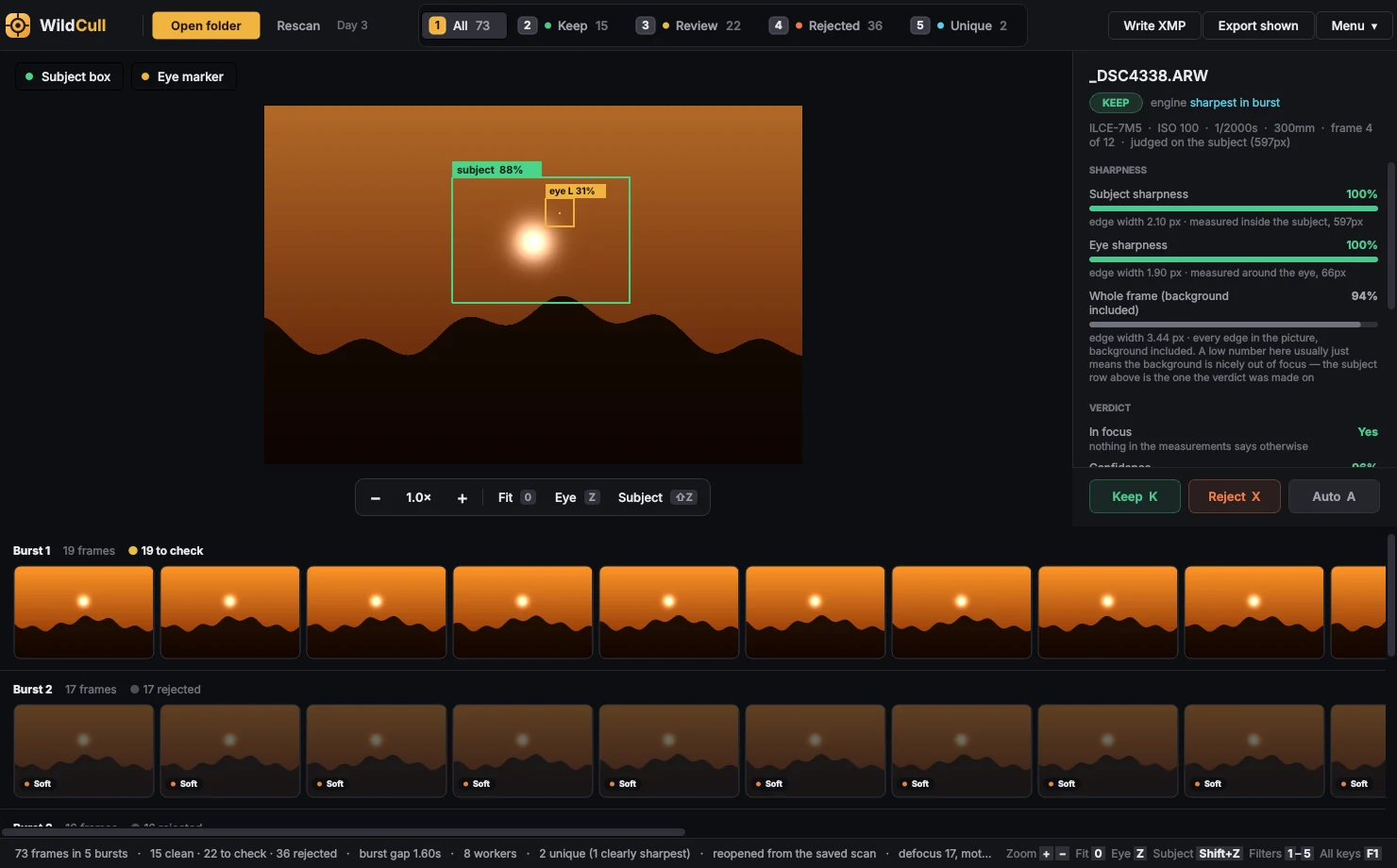
WildCull showing a burst of wildlife frames sorted into Keep, Review and Reject, with the evidence for the selected frame

Bursts laid out in capture order. Rejected frames are dimmed, never hidden, and say why.

How it works

From 2,500 frames to the few hundred worth looking at

1

Open a folder

Point WildCull at your RAW files. It groups them into bursts and measures every frame on your own computer. Reopening a folder you’ve already scanned is instant.

2

See what it found

Each frame is sorted into Keep, Review or Reject. Every verdict comes with the numbers behind it, and a box on the subject so you can tell at a glance if it looked in the right place.

3

You make the call

Walk the bursts with the arrow keys, press K to keep or X to reject, and your decision always wins. Then export, or write XMP sidecars for your editing software.

Evidence, not a score

It never asks you to just trust it

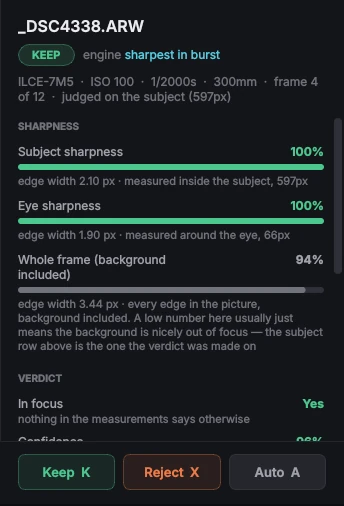
A verdict you can’t check is a verdict you can’t use. So every frame shows what was measured, in plain words, with the raw figure beside it.

KeepThe engine found nothing worth mentioning.
ReviewIt saw something and isn’t sure. These are the frames worth your eyes.
RejectA defect it’s confident about — soft focus, motion blur, camera shake, clipped highlights.
The details panel: sharpness meters, in-focus verdict, confidence and exposure figures
Built for wildlife

Made around how a safari shoot actually looks

Subject box & eye marker

See where the detector thinks the animal is, and where it thinks the eye is. Switch each on its own, and press Z to jump straight to the eye at full magnification.

Judges the animal, not the bokeh

A bird against a creamy background measures “soft” across the frame because the background is out of focus. WildCull says which pixels a verdict was made on, so you can tell the difference.

Dark backgrounds are fine

Long lens at dawn, subject in the only light there is. Shadow clipping is only ever a note, never a reason to reject, because that’s how wildlife photographs look.

One per burst

The “Unique” view shows one clean frame from each burst — the whole shoot at a glance. It’s labelled “sharpest”, never “best”, and where a burst is too close to call it says so.

Tune it to your taste

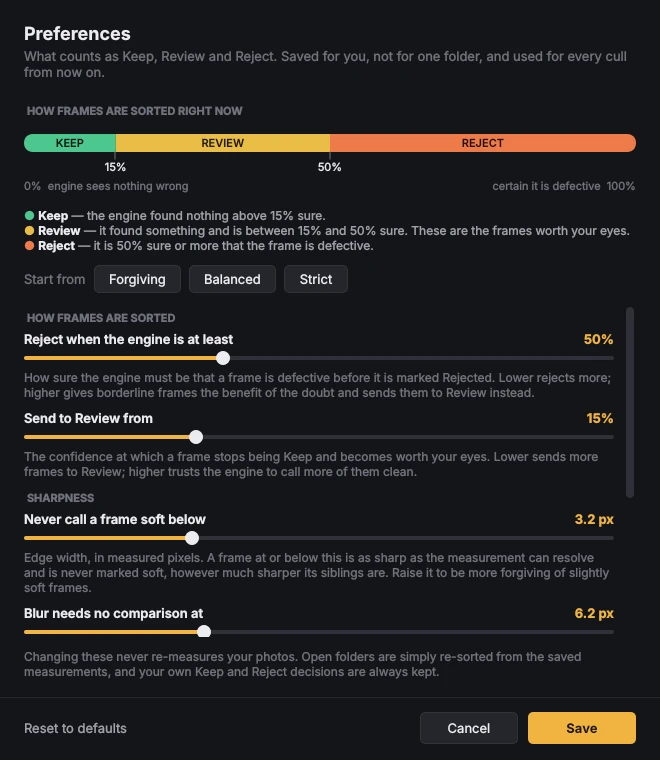
Open Preferences to see exactly what Keep, Review and Reject mean right now, and move the thresholds. Strict, balanced or forgiving. Your settings apply to every future cull.

Works with your workflow

Reads Sony, Canon, Nikon, Fujifilm and other common RAW formats. Writes XMP sidecars (rating, label and keywords) next to your files, or exports the frames you’re looking at into a folder.

Preferences: the Keep, Review and Reject boundaries and the sliders that move them
Your rules

You decide how strict “bad” is

  • See the basis. A live bar shows exactly where Keep ends and Reject begins.
  • Plain-English dials. Each says what raising or lowering it does.
  • Re-sorts instantly. Changing a setting never re-measures your photos.
  • Your decisions are safe. Hand-set Keeps and Rejects always win.

What WildCull won’t do

It won’t tell you which frame is the best. We tested whether measurable image properties predict which frame a photographer keeps, and they don’t reliably — so WildCull only ever claims a frame is bad, never that one is good. Survivors stay in capture order, with the obviously bad ones marked. Choosing the picture is still your eye’s job; WildCull just clears the pile in front of it.

The eye marker is a check, not a judge: it helps you decide how far to trust the other measurements on a frame. Its model was trained on mammals, so expect it to work better on a jackal than on a bee-eater.

Pricing

Pay once. Keep it forever.

Try everything free for 7 days. If it earns its place, one payment and it’s yours — with a year of updates included.

Free trial

$0 7 days
  • Everything unlocked
  • No card needed
  • Starts with your email
  • Your decisions stay if you buy
Start free trial
Most popular

WildCull

$79 one time
  • Yours forever — it never stops working
  • 12 months of updates included
  • Use it on 2 computers
  • Works offline in the field

Update plan

$19 per year
  • Optional, only if you want new versions
  • Adds a year of updates
  • Your copy keeps working either way
  • Buy it whenever you like

Prices in US dollars. Your licence key is emailed to you as soon as the payment is confirmed.

Try it

Download WildCull for Windows

Install it, open Menu → Membership, and start your trial with your email address. We’ll send a 6-digit code to confirm it’s you, and that’s all there is to it.

Windows 10 or 11, 64-bit.

Questions

Good to know

What happens when my 7 days are up?

New folders stop being scanned until you buy. Folders you’ve already scanned still open, and nothing you’ve decided is lost. Enter a licence key and carry on.

What does the $79 include?

A licence that never expires, for use on two of your computers, plus every update released in the first 12 months. After that your copy keeps working exactly as it is; you only need the $19 update plan if you want versions released after the first year.

Can I get a refund?

Because there’s a full 7-day trial with everything unlocked, you can see whether WildCull works for your photographs before paying, and purchases are final. If something is wrong with your key or your payment, email us and we’ll put it right.

Does it need the internet?

Only to start your trial, activate a licence and check it now and then. Once licensed it works offline for up to 30 days between checks, so a week at a camp with no signal is no problem. Past scans always open.

Are my photos uploaded anywhere?

No. Everything is measured on your own computer. WildCull only talks to our licence server to check your licence.

Which cameras and file types?

Common RAW formats including Sony ARW, Canon CR2/CR3, Nikon NEF, Fujifilm RAF, Olympus ORF, Panasonic RW2 and DNG, plus JPEG. It has been tested most on Sony and Canon files.

Will it work with Lightroom?

WildCull writes XMP sidecars with a rating, a colour label and keywords, which Lightroom reads. Lightroom ignores pick and reject flags in XMP, so WildCull doesn’t pretend to set them.

Mac or Linux?

Windows is the supported platform for now.

I lost my key.

Your key is in the email we sent after payment. If you can’t find it, email us from the address you bought with and we’ll resend it.